 LoftOS Knowledge Base
2025 Release Notes
Release Date: December 15, 2025
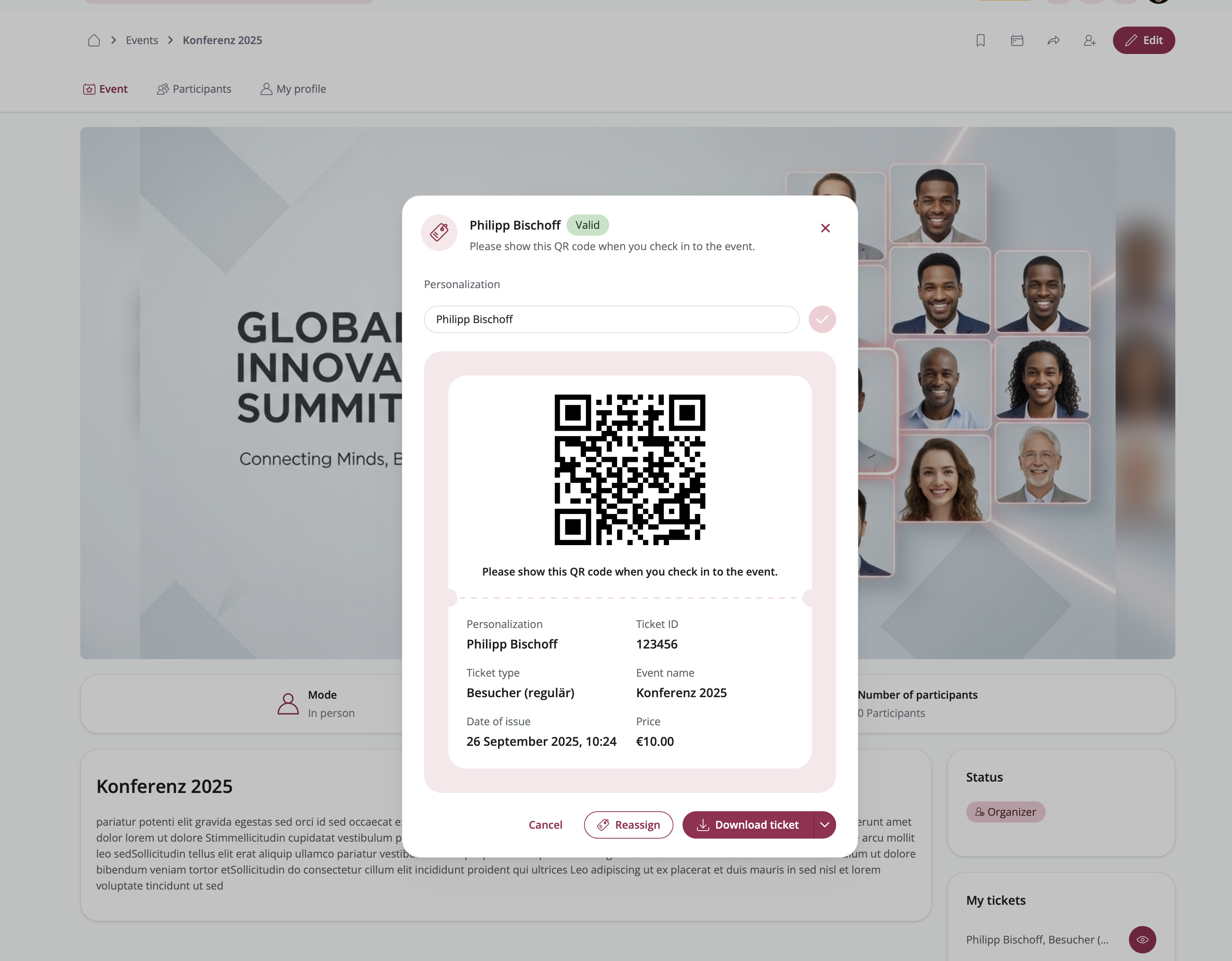
Transform your event management with our powerful ticketing system, now generally available! After extensive testing and refinement, we're excited to bring you a complete solution for managing both paid and free tickets. From seamless payment processing with Stripe and invoice options to QR code validation and comprehensive ticket lifecycle management, everything you need to run professional ticketed events is now at your fingertips.
Key Features:
-
Flexible Ticket Types: Create unlimited ticket types with customizable pricing, descriptions, and availability. Offer early bird discounts, VIP packages, student rates, or completely free tickets—all managed from a single interface.
-
Dual Payment Options: Accept payments through Stripe for instant credit card processing, or offer invoice-based payments for B2B events and corporate bookings. Enable both options simultaneously to give attendees maximum flexibility.
-
Smart Payment Connections: Set up Stripe Connect for secure OAuth integration or use API keys for quick setup. Create invoice connections with customizable payment terms, VAT rates, and billing details. Reuse connections across multiple events for streamlined management.
-
Complete Ticket Lifecycle: From purchase to check-in, manage every stage of the ticket journey. Assign complimentary tickets, track sales in real-time, handle reassignments, and revoke tickets when necessary—all with full audit trails.
-
QR Code Validation: Every ticket includes a unique QR code for secure entry validation. Use the built-in mobile scanner for instant check-in with audio feedback, duplicate scan warnings, and real-time attendance tracking.
-
Invoice Management: Track all invoice-based purchases with status monitoring (Pending, Paid, Overdue, Cancelled). Send payment reminders, download PDF invoices, and export comprehensive financial data for accounting.
-
Ticket Reassignment: Enable ticket holders to transfer their tickets to other platform users when plans change. Organizers maintain full control with the ability to reassign any ticket, regardless of settings.
-
Comprehensive Reporting: Export detailed ticket and invoice data as CSV or XLSX files. Track sales metrics, monitor payment status, analyze ticket type performance, and generate reports for stakeholders.
-
Multi-Currency Support: Offer tickets in different currencies for international events. Create separate ticket types for each currency with automatic currency handling in payment processing.
Get Started:
Navigate to your Event Settings and select "Ticketing" from the sidebar. Enable ticketing, create your ticket types, connect your payment methods (Stripe and/or Invoice), and start selling! Monitor sales through the Tickets Overview, manage invoices, and use the mobile scanner for seamless event check-in.
Related Features
- Events: Effortlessly organize events
User Mailing: Enhanced Campaign Management and Email Builder
Release Date: December 15, 2025
Transform your email communication with the completely redesigned User Mailing V2! This major update introduces a powerful campaign-based system that makes it easier than ever to create, manage, and send targeted emails to your community. Build beautiful emails with our visual editor, organize recipients with smart lists, and schedule campaigns for maximum impact.
Key Features:
- Campaign Management: Create and manage multiple email campaigns with dedicated dashboards for drafts, scheduled, and sent campaigns. Track performance with detailed analytics including open rates, click rates, and engagement metrics.
- Recipient Lists: Build targeted recipient lists using advanced filters based on user attributes, organization types, locations, and more. Save lists for reuse across multiple campaigns and manage subscriptions effortlessly.
- Visual Email Editor: Design professional emails with our intuitive drag-and-drop editor. Choose from Basic templates (text, images, buttons) or Data Cards to showcase platform content like events, organizations, and custom modules.
- Smart Scheduling: Schedule campaigns for one-time sends or set up recurring emails (daily, weekly, monthly). All times are timezone-aware to ensure optimal delivery.
- User Subscription Management: Users can manage their email preferences and unsubscribe from specific campaigns while staying connected to important platform notifications.
- Template System: Save time with reusable email templates and recipient lists. Create once, use multiple times across different campaigns.
Get Started:
Navigate to Admin → Other → User Mailing to explore the new campaign interface. Create your first campaign, build a recipient list using filters, design your email with the visual editor, and schedule it for delivery. Monitor campaign performance through the analytics dashboard to optimize your communication strategy!

Related Features
- Notification system: Don't let users miss important activities
- Members: Give more power to your community
Modules: AI Module Builder for Intelligent Module Creation
Release Date: November 27, 2025
Transform how you create custom modules with the new AI Module Builder! This powerful feature introduces an intelligent, AI-powered approach to module creation, making it faster and easier than ever to build perfectly structured modules tailored to your specific needs. Choose from three distinct creation modes—AI-powered generation, blank canvas, or template-based—giving you complete flexibility in how you build.
Key Features:
- AI-Powered Module Generation: Describe your module requirements in natural language, and let AI automatically generate a complete module structure with relevant sections, attributes, and configurations.
- Three Creation Modes: Choose the approach that works best for you:
- Template: Select from pre-configured templates for common use cases
- AI Builder: Leverage artificial intelligence to generate modules based on your description
- Blank: Start from scratch with a clean slate for complete customization
- Smart Module Configuration: The AI analyzes your requirements and automatically creates appropriate sections, attributes, and settings that match your intended use case.
How It Works:
When creating a new custom module, you'll now see the Build Mode Picker with three clear options. Select AI Builder to describe what kind of module you want to create, and the system will intelligently generate the structure for you. You can then review and refine the AI-generated configuration before finalizing your module.
Get Started:
Navigate to Admin → Modules and click "+ Module". Select your preferred build mode from the new picker interface. If using AI Builder, describe your module requirements, and watch as the system creates a tailored module structure for you. Review the generated configuration, make any adjustments, and save to start using your new module!

Related Features
- Custom Modules: Built it your way
- Module Template Library: Pre-configured modules for common use cases
Pages: Animation Settings for Dynamic Content
Release Date: November 26, 2025
Bring your pages to life with the new Animation Settings feature! You can now add professional animations to elements and templates in the page editor, creating more engaging and dynamic user experiences. Control every aspect of your animations—from type and direction to timing and triggers—giving you complete creative freedom to make your content stand out.
Key Features:
- Animation Types & Directions: Choose from various animation styles and customize their direction to create the perfect visual effect for your content.
- Smart Triggers: Control when animations activate—whether on page load, scroll, or other user interactions—ensuring animations enhance rather than distract from your message.
- Precise Timing Controls: Fine-tune animation duration and delay to create smooth, professional transitions that match your brand's style.
- Opacity Settings: Adjust element opacity during animations for subtle fade effects and sophisticated visual transitions.
- Advanced Configuration: Access detailed animation settings for granular control over every aspect of your animated elements.
- Template & Element Support: Apply animations to both individual elements and entire templates, providing flexibility for any design scenario.
Get Started:
Navigate to Admin → Modules → Pages and open any page in the editor. Select an element or template, then access the new Animation Settings to start adding dynamic animations to your content. Experiment with different animation types, directions, and timing to create engaging experiences that captivate your visitors!

Related Features
- Pages: Unleash Your Creativity, no boundaries
Pages: Sticky Navigation for Enhanced User Experience
Release Date: November 26, 2025
Keep your navigation always accessible with the new Sticky Navigation feature for Pages! Navigation bars can now be pinned to the top of the page, ensuring visitors always have easy access to your site's menu—no matter how far they scroll. This enhancement is perfect for creating professional, user-friendly websites with seamless navigation.
Key Features:
- Pin Navigation to Top: Enable sticky positioning for navigation sections, keeping them visible at the top of the page as users scroll through content.
- Smart Positioning Rules: Sticky navigation is only available for navbar templates placed as the first section on pages with both header and sidebar disabled, ensuring optimal layout and performance.
- Automatic Conflict Prevention: The system automatically disables sticky positioning when a navigation section is moved from the first position, maintaining design consistency.
- Easy Toggle Control: Simply enable or disable sticky navigation with a single toggle switch in the template settings.
- Improved User Experience: Visitors can navigate your site effortlessly without scrolling back to the top, creating a more professional and accessible browsing experience.
Get Started:
Navigate to Admin → Modules → Pages and edit a page with header and sidebar disabled. Add a navigation template as the first section, then enable "Pin Navigation to Top" in the section settings to activate sticky positioning!
Note: Sticky navigation is only available for navbar templates positioned as the first section on pages where both the platform header and sidebar are hidden.

Related Features
- Pages: Unleash Your Creativity, no boundaries
Groups: Announcements for Enhanced Communication
Release Date: October 8, 2025
Stay connected and informed within your Groups with the new Announcements feature! Group admins can now share important updates, news, and information with all members in a dedicated space. This powerful addition enhances communication and ensures everyone stays up-to-date with what matters most.
Key Features:
- Dedicated Announcement Space: A centralized location for sharing important updates, news, and information with all Group members.
- Rich Text Editor: Create engaging announcements with formatting options, links, and structured content using the same powerful editor available throughout the platform.
- Admin Control: Group admins can configure whether only admins can post announcements or allow all members to contribute.
- Interactive Engagement: Members can like and comment on announcements to show appreciation, ask questions, or start discussions.
- Notification Subscriptions: Members can subscribe to receive notifications when new announcements are posted, ensuring they never miss important updates.
- Flexible Management: Group admins can edit, delete, and disable comments on announcements as needed.
Get Started:
Navigate to the Announcements section within any Group to start sharing important updates. Group admins can configure announcement settings by clicking the settings icon in the header to control posting permissions and manage the announcement experience for their community.
Note: Group announcements are active by default. You can disable them in the group settings if not needed.

Related Features
- Groups: Build communities within communities
- Like, comment & share: Let users interact with content
- Notification system: Don't let users miss important activities
Pages: Enhanced Page Editor with Increased Editing Area
Release Date: October 8, 2025
We've redesigned the Page Editor to give you more space and a cleaner interface for building your pages. The new layout maximizes your editing area while keeping all essential tools easily accessible through an intuitive sidebar navigation.
Key Features:
- Expanded Editing Area: Enjoy significantly more screen space for designing and previewing your pages with the new streamlined layout.
- Improved Sidebar Navigation: Access templates, layout tools, synced sections, and settings through a compact sidebar that keeps your workspace uncluttered.
- Enhanced Template Selection: Browse and select templates more efficiently with the redesigned template preview interface.
- Streamlined Settings Access: Page settings are now organized in a dedicated view, making it easier to configure your page properties and view analytics.
- Better Visual Feedback: Clearer visual indicators help you understand which elements are selected and what you're currently editing.
Get Started:
Navigate to Admin → Modules → Pages and open any page in the editor to experience the improved interface. The new layout automatically provides more room for your content while keeping all tools within easy reach!

Related Features
- Pages: Unleash Your Creativity, no boundaries
User Onboarding: Enhanced Architecture and Improved Experience
Release Date: September 22, 2025
We've completely modernized the onboarding module with significant architectural improvements and enhanced user experience.
Key Features:
- Modernized Interface: Experience a completely redesigned interface with improved navigation, cleaner layouts, and more intuitive controls.
- Enhanced Workflow Builder: Create and edit onboarding journeys with a new configuration builder that simplifies the process of setting up personalized user experiences.
- Improved User Type Management: Better integration with user types and more streamlined selection processes when creating targeted onboarding flows.
Get Started: The enhanced onboarding experience is automatically available to all administrators. Navigate to Admin → Tools → Onboarding to explore the improved interface and take advantage of the new configuration tools for creating more effective user onboarding journeys.

Related Features
- User Onboarding: Multi-step onboarding journeys
- Access Management: Flexible access controls
- Members: Give more power to your community
Chat: Enhanced Text Input with Formatting and Emoji Support
Release Date: September 12, 2025
Transform your communication experience with our enhanced chat input! The chat interface now supports rich text formatting and seamless emoji integration, making conversations more expressive and engaging. Whether you're emphasizing important points with bold text or adding personality with emojis, your messages can now convey exactly what you mean.
Key Features:
- Rich Text Formatting: Apply bold, italic, underline, and other text formatting options to emphasize your messages and improve readability.
- Emoji Support: Access emojis instantly by typing a colon (:) or clicking the emoji icon for quick emoji selection and insertion.
- Consistent Editor Experience: The same powerful editor is also used in comments throughout the platform, ensuring a unified and familiar experience.
- Intuitive Interface: Formatting tools are easily accessible and user-friendly, making rich text creation effortless for all users.
Get Started: Start using the enhanced chat input immediately! Type your message and use the formatting toolbar to style your text, or begin typing ":" to browse and select emojis. The same features are available when adding comments across the platform.

Related Features
- Chat: Let users communicate
- Like, comment & share: Let users interact with content
LoftOS Themes – Top Navigation
Release Date: September 8, 2025
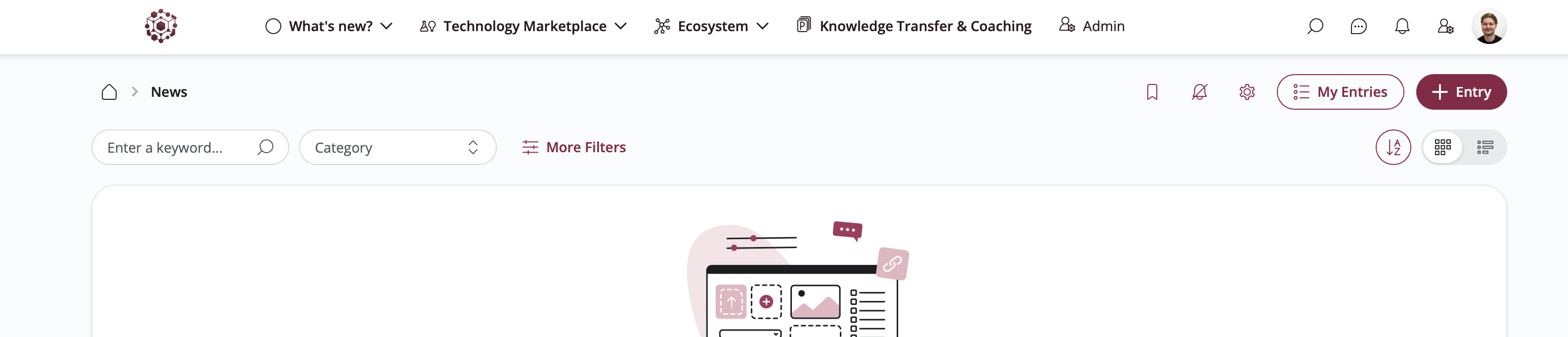
Expand your design possibilities with the new "Top Navigation" theme! Building on the success of our Classic and Side Bar themes, we're introducing a third layout option that places navigation at the top of your platform. This modern horizontal navigation style offers a fresh perspective on platform organization, giving you even more flexibility to create the perfect user experience for your community.
Key Features:
- Top Navigation Layout: Experience a sleek horizontal navigation bar positioned at the top of your platform for easy access to all modules and features.
- Enhanced Theme System: Choose between three distinct layout styles: Classic, Side Bar, and the new Top Navigation to match your brand and user preferences.
- Improved Admin Interface: Redesigned design settings with better organization and clearer theme selection options in the admin area.
- Seamless Navigation Controls: Optimized navigation behavior and responsive design that adapts beautifully across all devices.
Get Started:
Navigate to your admin area Settings --> Design, explore the new "Top Navigation" theme option, and customize your platform's layout to create a unique and engaging experience for your users!
Related Features
- Customized branding and domain: Reflect your identity
- Navigation: Structure for unique member experiences
- LoftOS Themes: Personalize your platform layout
LoftOS Themes – Side Bar
Release Date: July 29, 2025
Personalize your platform like never before! With the introduction of LoftOS Themes, you can now choose between different layout styles to match their preferences. The first new addition is the "Side Bar" theme—offering a modern and streamlined layout alongside the existing "Classic" theme. Additional customization options such as dark mode, accent colors, font styles, and spacing are also available for an even more tailored experience.
Key Features:
- Theme Selection: Choose between the "Classic" layout or the new "Side Bar" layout.
- Advanced Customization: Adjust font, colors, spacing, and more to fit your brand or personal taste.
- Dark Mode: Switch between light and dark modes with a single toggle.
Get Started:
Go to the design settings in your admin area Settings --> Design, select your preferred layout and customize your platform's look to suit your needs!

Related Features
- Customized branding and domain: Reflect your identity
- Navigation: Structure for unique member experiences
Custom Modules: Image Attribute
Release Date: July 29, 2025
You can now enhance your custom modules with visuals! The new Image Attribute allows users to upload and configure a single image per entry, offering more flexibility in content presentation. Admins can define how the image behaves and which options are available for users.
Key Features:
- Configurable Settings: Admins can enable or disable features like zoom on click, alt text, external links, image source, and object fit.
- Aspect Ratio Support: Admins can select an aspect ratio, and users will see recommended resolutions to match it.
- User Controls: Depending on admin settings, users can add alt text, set an external link, define a source, and adjust the image's object fit (contain, cover, blur).
Get Started:
Go to your Custom Modules setup, add the new "Image" attribute, and define how it should behave. Your users can then start uploading and customizing images in their module entries right away!

Related Features
- Custom Modules: Built it your way
Events: Add "My Schedule" Overview
Release Date: July 14, 2025
Take full control of your event experience with the new "My Schedule" feature! Users can now create a personalized agenda by adding sessions and meetings to their own schedule. 1-on-1 meetings are automatically included, and the system highlights time conflicts to help users plan their day more efficiently.
Key Features:
- Personalized Agenda: Add selected agenda points to "My Schedule" for quick and easy access.
- Simplified Navigation: Quickly access your personalized agenda through the "My Schedule" section.
- Conflict Detection: The system highlights scheduling conflicts if you're already registered for overlapping sessions or meetings.
Get Started:
Browse the event agenda, add your preferred sessions to "My Schedule," and enjoy a more organized and tailored event experience!

Related Features
- Events: Effortlessly organize events
Events: Add Events to Personal Calendar
Release Date: June 30, 2025
Never miss an event again! Users can now add events directly to their personal calendars, including Google Calendar, Outlook, or iCal, with just one click. A new button in the event navigation makes it quick and easy to stay organized.
Key Features:
- Calendar Integration: Add events to Google Calendar, Outlook, or export as an iCal file.
- One-Click Action: A new button in the event navigation triggers the add-to-calendar action instantly.
- Better Scheduling: Ensure important events are always visible in your personal calendar.
Get Started:
Visit any event page and click the new calendar button in the navigation to add the event to your preferred calendar today!

Related Features
- Events: Effortlessly organize events
Imports: Create Custom Attributes During Import
Release Date: June 17, 2025
We've made importing data even smoother! Users can now create custom attributes directly within the data import screen, saving time and reducing the need to switch between different setup steps.
Key Features:
- Inline Attribute Creation: Add new custom attributes while mapping your import file.
- Faster Workflow: No need to leave the import process to create missing fields.
- Improved Flexibility: Easily handle unique data needs as they come up during import.
Get Started:
Upload your CSV/XLSX file and add any needed custom attributes right from the import screen to streamline your data onboarding!

Related Features
- Imports: Migrate your data effortlessly
Events: Control Registration Questions
Release Date: June 2, 2025
We've enhanced the logic and control around registration questions to better support flexible onboarding and data collection—especially for users who join an event after buying a ticket or being added manually. Admins now have full control over which questions are mandatory and which can be skipped, and users are guided accordingly.
Key Features
- First-Time Answering Always Allowed: Regardless of whether answer editing is enabled, users who haven't yet responded are always prompted to do so.
- Required vs. Optional Questions: Admins can define which questions must be answered and which are skippable, giving full flexibility over the registration process.
- Dynamic UI Prompts: Users who haven't yet completed their registration questions will see a clear "Answer Questions" button—ensuring all necessary data is collected, even post-join.
Get Started
When setting up registration questions for an event, mark each as required or optional. Users joining the event—no matter how—will be guided to complete the required steps before they're considered fully registered.

Related Features
- Events: Effortlessly organize events
General: Improved Texteditor
Release Date: June 2, 2025
We've upgraded the text editor to offer a more intuitive and flexible writing experience. With a modern block-based design, users can now structure content more clearly and format information with ease—making content creation more powerful and enjoyable.
Key Features
- Flexible Block-Based Editing: Create structured content with customizable blocks such as text, images, quotes, and lists.
- Streamlined Formatting Options: Format content efficiently with intuitive tools that stay out of the way until you need them.
- Enhanced User Experience: A cleaner interface and smoother interactions make writing and editing faster, more focused, and more enjoyable.
Get Started
Try out the improved text editor wherever content can be created or edited. Simply click into a text field and press "/" or select a text to explore the new options to create your content more efficiently than ever before.

Related Features
- Custom Modules: Built it your way
Chat: Synced Channels
Release Date: May 5, 2025
Managing members in chat spaces for Groups and Programs often required manual effort and lacked consistency with the associated context. With the new Synced Channels option, admins can now automatically synchronize chat membership with the participants of a specific context.
Key Features:
- Automatic Membership Sync: All current and future members of the linked context (Group or Program) are automatically added to the chat.
- Manual Control: Members can still be added or removed manually, even when syncing is active.
- Context-Based Permissions: Only context admins (e.g., group organizers) can activate or deactivate syncing, ensuring control remains with the responsible owner.
Get Started
Navigate to communication (e.g., in groups) and click on Create Space. Enable Sync with Members in Group / Program to automatically add existing and new context users to the space.

Related Features
- Chat: Let users communicate
- Groups: Build communities within communities
- Programs: Create valuable learning programs
Notification: New Entry Notification for Custom Module
Release Date: April 23, 2025
Stay in the loop with real-time updates! Users can now subscribe to receive notifications whenever new entries are added to a custom module. This subscription feature helps users stay engaged and informed without the need for constant manual checks.
Key Features:
- Subscription-Based Notifications: Users can opt in to receive alerts for new entries in selected custom modules.
- Real-Time Updates: Get notified as soon as new content is added, ensuring timely awareness.
- Enhanced User Control: Users manage their own subscriptions, tailoring notifications to their needs and interests.
Get Started:
Visit any custom module and click the notification bell to subscribe. Get notified the moment new entries go live!

Related Features
- Custom Modules: Built it your way
- Notification system: Don't let users miss important activities
Modules: Custom Modules – Set Header Attribute per Module
Release Date: April 23, 2025
Customize your modules like never before! You can now override an attribute's name, description, and placeholder text at the module level—without affecting its use elsewhere. This gives you greater flexibility in tailoring modules to different contexts.
Key Features:
- Module-Specific Overrides: Adjust the header attribute's name, description, and placeholder text individually per module.
- Flexible Customization: Use the same attribute across modules with unique names and instructions for each use case.
- Improved Clarity: Tailor attribute presentation to better match the purpose of each module and guide users more effectively.
Get Started:
Head to your custom module settings and define your module-specific attributes in the editor section!

Related Features
- Custom Modules: Built it your way
Notifications: Define Which Notifications You Want to Receive
Release Date: April 23, 2025
Take full control of your notifications! With our new notification settings section, users can now manage all their notification preferences in one convenient location—ensuring you only receive the updates that matter to you.
Key Features:
- Centralized Notification Settings: Access and manage all notification types from a single page.
- Full Control: Choose exactly which notifications you want to receiv.
- Personalized Experience: Tailor your notifications to match your role, activity, and preferences.
Get Started:
Visit the new notification settings sections in your profile settings to customize your notification preferences and create a more focused user experience today!

Related Features
- Notification system: Don't let users miss important activities
Admin Area: Updated UX and Navigation to Handle New Module Structure
Release Date: April 23, 2025
We've redesigned the Admin Area to better support our evolving module structure! With a cleaner layout and more intuitive navigation, admins can now focus on what truly matters—without distraction or clutter.
Key Features:
- Streamlined Navigation: A simplified menu structure helps admins quickly find the tools and settings they need.
- Improved UX: A cleaner, more focused interface designed to enhance productivity and ease of use.
- Optimized for Scalability: Built to support current and future modules, making the Admin Area future-proof and more manageable.
Get Started:
Explore the updated Admin Area today and experience a more efficient and user-friendly way to manage your platform.

Modules: Pages – Synced Sections Within a Project
Release Date: April 9, 2025
Building multi-page websites just became much more efficient! With synced sections, such as a shared navigation bar, changes made to one page can now be automatically reflected across all pages within the same project—no more manual updates on each individual page.
Key Features:
- Synced Sections: Create shared sections (e.g., navigation bars) that automatically appear on all project pages.
- Automatic Updates: Add or change a link once, and it will update across every connected page.
- Streamlined Page Management: Save time and ensure consistency when managing large websites or complex page structures.
Get Started:
Set up a synced section in your project-pages settings and experience the ease of unified content updates across all related pages!

Related Features
- Pages: Unleash Your Creativity, no boundaries
Modules: Module Template Library
Release Date: March 26, 2025
Setting up modules is now easier than ever! With the new Module Template Library, customers can choose from a selection of pre-configured modules, saving time and effort when creating new module setups.
Key Features:
- Pre-Configured Modules: Select from a variety of ready-to-use templates tailored to different use cases.
- Faster Setup: Reduce configuration time by using templates instead of starting from scratch.
- Available Across All Platforms: Access the Module Library seamlessly, no matter your setup.
Get Started:
Explore the new Module Template Library by creating a new module and quickly set up modules that fit your needs with just a few clicks!

Related Features
- Custom Modules: Built it your way
Custom Modules: Allow Restriction by Creation Date
Release Date: March 26, 2025
Keep your data relevant and up to date! With the new "time limit" restriction for custom modules, administrators can now ensure that only recent and relevant entries remain visible within a module.
Key Features:
- Time-Based Restrictions: Limit entries to those created or updated within a specified timeframe (e.g., last 6 months).
- Improved Data Relevance: Ensure users work with the most up-to-date and accurate information.
- Reduced Clutter: Automatically hide outdated entries, making module content more manageable and useful.
Get Started:
Admins can set time-based restrictions in the module settings to maintain a clean and relevant data environment. Try it out today!

Related Features
- Custom Modules: Built it your way
Events: Registration Questions
Release Date: March 26, 2025
Event registration just got more flexible! Event admins can now collect important information from participants during the registration process by adding custom questions. This ensures organizers get the details they need upfront.
Key Features:
- Custom Registration Questions: Event admins can define specific questions for participants to answer.
- Mandatory Responses: Users must complete the required fields to finalize their registration.
- Better Event Planning: Gather relevant participant information in advance to improve event organization.
Get Started:
Event admins can set up registration questions in the event settings. Start customizing your event sign-ups today!

Related Features
- Events: Effortlessly organize events
Watchlist: Option to Save All Entries
Release Date: March 26, 2025
Saving entries to your Watchlist just got easier! Instead of adding items one by one, users can now save all entries from a database with a single click, streamlining the bookmarking process.
Key Features:
- Save All Option: Quickly add all database entries to your Watchlist in one step.
- Efficiency Boost: No more manual selection—save time and effort with bulk bookmarking.
- Improved Content Management: Easily keep track of important entries without missing any.
Get Started:
Navigate to the respective Module and use the new Add results to Watchlist option to bookmark all relevant entries instantly!

Related Features
- Watchlist: Organize what matters most
Pages: Option to Select Anchors for Links
Release Date: March 26, 2025
Enhance the flexibility of your pages with anchor links! You can now link directly to specific sections within a page, making it easier to highlight key content and improve navigation.
Key Features:
- Anchor Links: Create direct links to specific sections of a page for better accessibility.
- Enhanced Navigation: Guide users to important content without scrolling.
- Improved Page Usability: Make your pages more dynamic and interactive by linking to relevant sections effortlessly.
Get Started:
Simply choose the Link destination Section and link them to highlight key sections. Try it out today to make navigation smoother and more efficient!

Related Features
- Pages: Unleash Your Creativity, no boundaries
Pages: Group Pages by Project
Release Date: March 12, 2025
Say goodbye to unstructured page lists! With our latest update, you can now group pages by projects, making it easier to organize, manage, and navigate your content efficiently.
Key Features:
- Project-Based Grouping: Structure your pages within defined projects for a more organized workspace.
- Improved Navigation: Quickly find relevant pages without sifting through an unstructured list.
- Better Project Management: Keep related pages together, enhancing collaboration and workflow efficiency.
Get Started:
Head over to the Pages section and start grouping your pages by projects to create a more structured and efficient content management experience!

Related Features
- Pages: Unleash Your Creativity, no boundaries
Imports: New Attributes (Date, Address, Linear Scale, Tree, Link)
Release Date: March 12, 2025
We're expanding our import capabilities! Admins can now import additional data types from CSV/XLSX files, allowing for more flexibility and accuracy when managing data within the platform.
Key Features:
- Date Field: Import and store date values seamlessly.
- Address Field: Easily import location-based data for better record-keeping.
- Number Field: Supports both integer and float values for precise numerical data.
- Range Field: Import range-based values to enhance structured data input.
Get Started:
Simply upload a CSV/XLSX file with the new supported attributes, and the system will automatically recognize and process the data accordingly!
Related Features
- Imports: Migrate your data effortlessly
Custom Module Interactions: Connect Form Applications with Pipelines
Release Date: February 24, 2025
Streamline your application assessment process with our latest enhancement! Form Applications in custom modules can now be directly connected to the pipeline module, making it easier to track, evaluate, and manage submissions. With just a single click, applications can seamlessly integrate into your existing workflow.
Key Features:
- Effortless Connection: Link form applications to the pipeline module with the new "Connect to Pipeline" option in the application submissions overview.
- Improved Application Management: Assess and process applications more effectively by integrating them into an organized workflow.
- Seamless Integration: Enhance collaboration and decision-making by managing form applications alongside other pipeline entries.
Get Started:
Navigate to the application submissions overview in your custom module and use the "Connect to Pipeline" button to link applications. Just click on the pipeline icon on the top right corner.

Related Features
- Custom Modules: Built it your way
- Forms: Collect information with ease
Custom Modules: Enhanced Interactions & Form Management
Release Date: February 24, 2025
We've expanded the capabilities of custom modules by introducing interaction options and improved form management. Now, admins can define interactions within their modules, allowing users to submit forms or access external links. These enhancements offer greater flexibility, customization, and control over how users engage with custom module entries.
Key Features:
- Flexible Interaction Options: Add forms or external links to custom modules, giving users multiple ways to engage.
- Customizable Forms & Submission Controls: Reuse or create forms, enable acceptance workflows, and set deadlines.
- Streamlined Management: Define button styles, receive submission notifications, and review responses with full visibility.
Get Started:
To add an interaction, navigate to your custom module settings and choose whether users should submit a form, follow an external link, or have both options. Configure form permissions, acceptance settings, and button styling to fit your needs. Once set up, submissions can be reviewed and managed directly from the module interface.

Related Features
- Custom Modules: Built it your way
Export for Watchlists and Packages
Release Date: February 24, 2025
Managing your data just got easier! Users can now export Watchlists and Packages as CSV files, allowing for better handling and analysis outside the platform.
Key Features:
- CSV Export: Download Watchlists and Packages in CSV format for seamless data management.
- Increased Flexibility: Work with your exported data in external tools, such as spreadsheets or databases, for further processing.
Get Started:
Navigate to your respective Watchlist or the Packages section and click on the new export button to download your data in CSV format.

Related Features
- Watchlist: Organize what matters most
- Packages: Offer different memberships and monetize them
Roles: Overview and Export
Release Date: February 24, 2025
Get a clearer view of role assignments within your platform! We're introducing a new Roles Overview that provides key insights, including the number of users assigned to each role. Additionally, you can now export this data as a CSV file for easier management and analysis.
Key Features:
- Roles Overview: Gain visibility into role distribution, including the total number of users per role.
- CSV Export: Export role data for external processing and reporting.
- Improved Management: Easily track and analyze role assignments, just like with package subscriptions.
Get Started:
Visit the Roles section in the admin area to explore the new overview and use the export feature to download role data in CSV format.

Related Features
- Access Management: Flexible access controls
Imports Upgraded: Smarter Management & Entry Ownership
Release Date: February 14, 2025
The import function has been enhanced with intuitive improvements and ownership tracking. Admins can now manage imports more efficiently with streamlined workflows, better filtering, and the ability to assign owners to imported entries—making oversight and accountability more straightforward.
Key Features:
Entry Ownership Assignment: Assign a dedicated owner to imported entries during or after the import process, improving traceability and task delegation.
Enhanced Status Filtering: Quickly sort imports with updated status filters, making it easier to prioritize and manage pending or completed actions.
Bulk Acceptance Workflow: Accept or reject multiple imported entries at once, saving time during large-scale data imports.
Get Started:
Visit the imports feature in your Admin Area to explore the new enhancements. To assign an owner, select the desired user from the dropdown during import setup and use bulk acceptance to process imports in batches!

Related Features
- Imports: Migrate your data effortlessly
Notification: iOS Push Notifications
Release Date: January 27, 2025
Stay informed on the go with our latest feature for iOS users! Push notifications are now available, ensuring you never miss important updates or alerts directly on your device.
Key Features:
- Timely Updates: Receive push notifications on your iOS device, keeping you up-to-date with essential information and activities.
- Seamless Integration: Notifications are fully integrated with our iOS mobile app, providing a smooth and efficient user experience.
Get Started:
Push notifications in the iOS App are enabled on by default.
Related Features
- Notification system: Don't let users miss important activities
Share Profile with QR Code: Instant Access & Watchlist Tracking
Release Date: January 27, 2025
Streamline profile sharing and track interactions effortlessly! Users can now generate a QR code to share their profile instantly, allowing others to view it with a simple scan. Plus, each share can automatically log an entry in the user's watchlist for easy follow-up.
Key Features:
- QR Code Profile Sharing: Generate and share a personalized QR code to grant quick access to your profile—no manual links or searches required.
- Automated Watchlist Updates: Sharing your profile via QR code can trigger an entry in your watchlist, helping you track who's viewed your profile and when.
Get Started:
To share your profile, navigate to your profile page, click on the QR Code icon and let others scan the generated code.

Related Features
- Like, comment & share: Let users interact with content
Language Picker Relocation
Release Date: January 15, 2025
The language picker has been relocated from the header to the footer and the User Menu, simplifying the user interface and creating additional space in the header bar.
Changes:
- Language selector moved to footer and User Menu
- Improved header bar layout
- Maintained easy language selection accessibility

Related Features
- Multiple languages and live translations: Lower language barriers
Watchlists: Elevate Your Tracking and Collaboration Experience
Release Date: January 13, 2025
We're thrilled to introduce a powerful upgrade to Watchlists, transforming how you monitor, organize, and collaborate on your key content. This comprehensive update empowers users with multiple watchlists, sharing & collaborating capabilities, and a new watchlist widget for seamless tracking.
Key Features:
-
Multiple Watchlist Creation: Organize your tracking with unlimited specialized lists across all kinds of content. Easily switch between Watchlists with a single click, giving you ultimate flexibility in managing your priorities.
-
New Watchlist Widget: Enable a new Watchlists widget that provides instant visibility of all created watchlists. Enjoy real-time status updates directly from the widget.
-
Collaborative Sharing: Invite team members to join and contribute to specific Watchlists with new permission controls. Set view, edit, and manage access levels, enabling seamless team collaboration and synchronized tracking across your organization.
Get Started: Explore the new Watchlist features by clicking on the My Watchlists section in the user navigation. Create your first multi-purpose Watchlist, invite collaborators, and experience a more connected tracking experience!

Related Features
- Watchlist: Organize what matters most
- Widgets: Spotlight important updates